Keep evidence attached
Findings preserve source provenance and revision identity before a Procore handoff is prepared.
PERMIT SHERIFF × PROCORE · TECHNICAL FEASIBILITY PREVIEW
Permit Sheriff adds evidence-backed permit review and readiness intelligence to the project workflow teams already manage in Procore. Verified findings stay connected to their source evidence, and Procore writes remain explicit, permission-checked, and human-authorized.
TECHNICAL FEASIBILITY REVIEW
Open the review materials without signing in.
Public integration preview: https://permitsheriff.com/procore
Recorded ElevenLabs narration. Press play when you're ready.
A permit correction should lead to a clear next action. Permit Sheriff helps construction teams turn dense correction notices into accountable follow-through inside Procore. Each finding stays connected to its original source, so reviewers can distinguish official direction from interpretation and approve exactly what moves forward.
We've demonstrated the handoff in Procore's sandbox: a reviewed test finding becomes a private Observation in the selected project, with a verified result. That creates a practical path to less manual re-entry, less context switching, and clearer accountability.
Permissioned agents can also access Permit Sheriff's intelligence through governed APIs and MCP. Together, Permit Sheriff and Procore can bring permit intelligence into the workflows teams already use. Explore the walkthrough to see the value, the working integration, and the controls behind it.
Narration note: A verified sandbox test does not establish production runtime validation or final release approval for this updated landing page.
BETTER TOGETHER
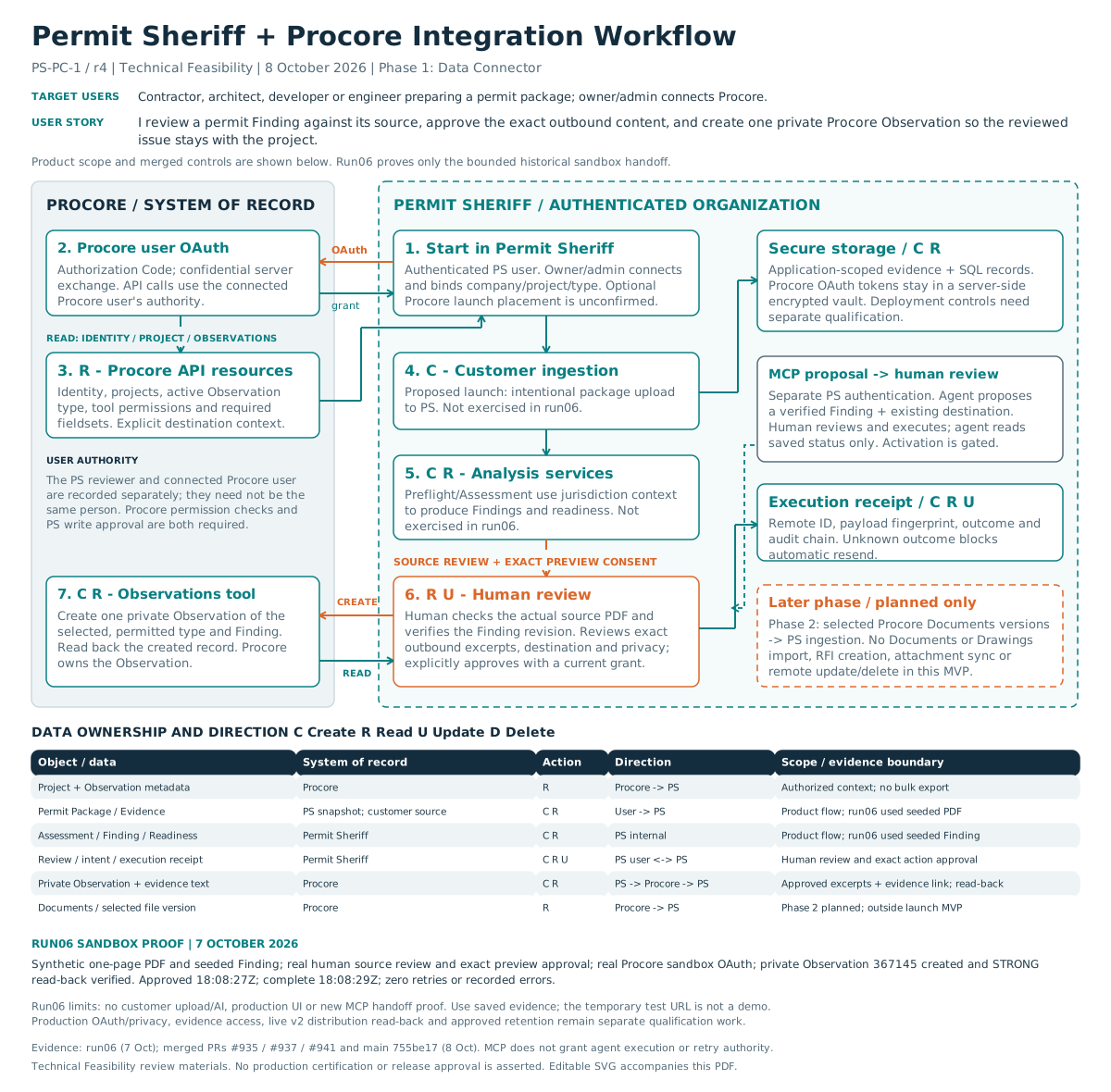
Procore remains the project execution environment. Permit Sheriff specializes in permit documents, evidence-linked findings, readiness review, correction history, Permit Memory, and regulatory workflow context. The integration moves reviewed permit intelligence into the project record without pretending an AI finding is an approval.
Findings preserve source provenance and revision identity before a Procore handoff is prepared.
A verified finding can become a structured Procore Observation instead of being manually copied between systems.
Permit Sheriff checks destination readiness, shows the exact payload, and requires explicit confirmation before write-back.
USER WORKFLOW
Permit intelligence. Human control. Project action.
ILLUSTRATED WORKFLOWBIDIRECTIONAL DATA FLOW
PROCORE → PERMIT SHERIFF
PERMIT SHERIFF → PROCORE
The integration does not perform unrestricted project synchronization or autonomous background writes. RFIs, Drawings, Coordination Issues, Submittals, Documents, budgets, and schedules are not presented as Phase 1 Procore write destinations.
BUILT FOR PEOPLE AND AGENTS
Permit Sheriff exposes secured REST and Model Context Protocol interfaces over the same tenant-scoped permit intelligence services used by the application. Agents can analyze permit packages, retrieve intelligence packets and next actions, and inspect project attention or schedule data when authorized.
Important boundary: MCP is Permit Sheriff's agent-facing interface. Procore communication uses the Procore OAuth/API integration. MCP does not replace the Procore API and does not give an agent autonomous authority to create Procore records.
Optional Procore MCP handoff: The implemented propose_procore_handoffand get_procore_handoff_status tools are disabled by default and require separately authorized tenant activation. An eligible agent proposes a verified finding for an already bound destination and receives an authenticated human-review link. A separate signed-in reviewer verifies the source, exact preview, destination, and permissions before explicitly executing the existing write path. The agent can read only its correlated saved result; it cannot approve, execute, retry, or fetch fresh Procore state. This proposal flow was not included in the historical sandbox run.
preflight_permit_packageanalyze_permit_packageget_analysis_statusget_permit_intelligence_packetget_next_actionsget_project_attentionget_project_scheduleget_jurisdiction_contextAUTHENTICATED MCP QUICKSTART
Endpoint: POST https://permitsheriff.com/api/agent/v1/mcp
Use a tenant-bound Bearer API key in your server or MCP client's secure credential store. Your Permit Sheriff browser sign-in and Procore OAuth connection do not authenticate this endpoint. This example lists tools; it does not submit an analysis or create a Procore record.
curl --request POST 'https://permitsheriff.com/api/agent/v1/mcp' \
  --header "Authorization: Bearer $PERMIT_SHERIFF_API_KEY" \
  --header 'Content-Type: application/json' \
  --header 'Accept: application/json' \
  --header 'MCP-Protocol-Version: 2026-07-28' \
  --header 'Mcp-Method: tools/list' \
  --data '{"jsonrpc":"2.0","id":1,"method":"tools/list","params":{}}'
PERMIT_SHERIFF_API_KEY is a placeholder environment variable, never a key to paste into this public page. Modern requests use matching Mcp-Method headers; tool calls also require Mcp-Name matching the requested tool. Browser-originated requests require an allowed origin.
A listed tool is not a permission grant. Every call remains subject to the key's tenant, scopes, revocation status, plan and usage rules. Free Procore setup does not grant API credits or paid analyses. The self-service Direct API currently grants narrow contractor verification and jurisdiction resolution access; broader permit-analysis and partner-agent scopes require separate provisioning.
GOVERNED ACTION
Procore access and refresh credentials remain server-side in Permit Sheriff's encrypted credential vault and are bound to the Permit Sheriff organization.
Destination readiness is evaluated against the selected company/project context before the write is prepared and again before execution.
The preparing user approves the exact saved preview and payload digest. Stale findings, changed bindings, or changed authorization fail closed.
Permit Sheriff reads the returned Observation back and records a durable receipt. Ambiguous outcomes require reconciliation instead of blind POST retries.
PROCORE WORKSPACE
We are verifying your Permit Sheriff session before showing the next step.
PRODUCT & SUPPORT
These resources describe the proposed integration and bounded sandbox evidence, not production certification. The formal Technical Assessment is completed in Procore's own assessment form, not published on this page.